现有脚本的问题 网上有很多重置 Windows 版 Navicat 使用时间的脚本,重置的方式是在 Windows 注册表中删除以下键
HKEY_CURRENT_USER\Software\PremiumSoft\NavicatPremium\Registration17XEN,具体的键视安装的版本而定HKEY_CURRENT_USER\Software\PremiumSoft\NavicatPremium\UpdateHKEY_CURRENT_USER\Software\Classes\CLSID\{XXXXXXXX-XXXX-XXXX-XXXX-XXXXXXXXXXXX},这个键下面包含子健 InfoHKEY_CURRENT_USER\Software\Classes\CLSID\{YYYYYYYY-YYYY-YYYY-YYYY-YYYYYYYYYYYY},这个键下面包含子健 ShellInfo
不同的安装 {XXXXXXXX-XXXX-XXXX-XXXX-XXXXXXXXXXXX} 和 {YYYYYYYY-YYYY-YYYY-YYYY-YYYYYYYYYYYY} 不一样。哪些脚本对前两项的处理问题不大,但对后两项的处理比较粗糙,存在误删问题,比如可能误删 OneDrive 的注册表键
此事在谨慎使用网上流传的Navicat重置试用期bat脚本 一文中亦有记载。
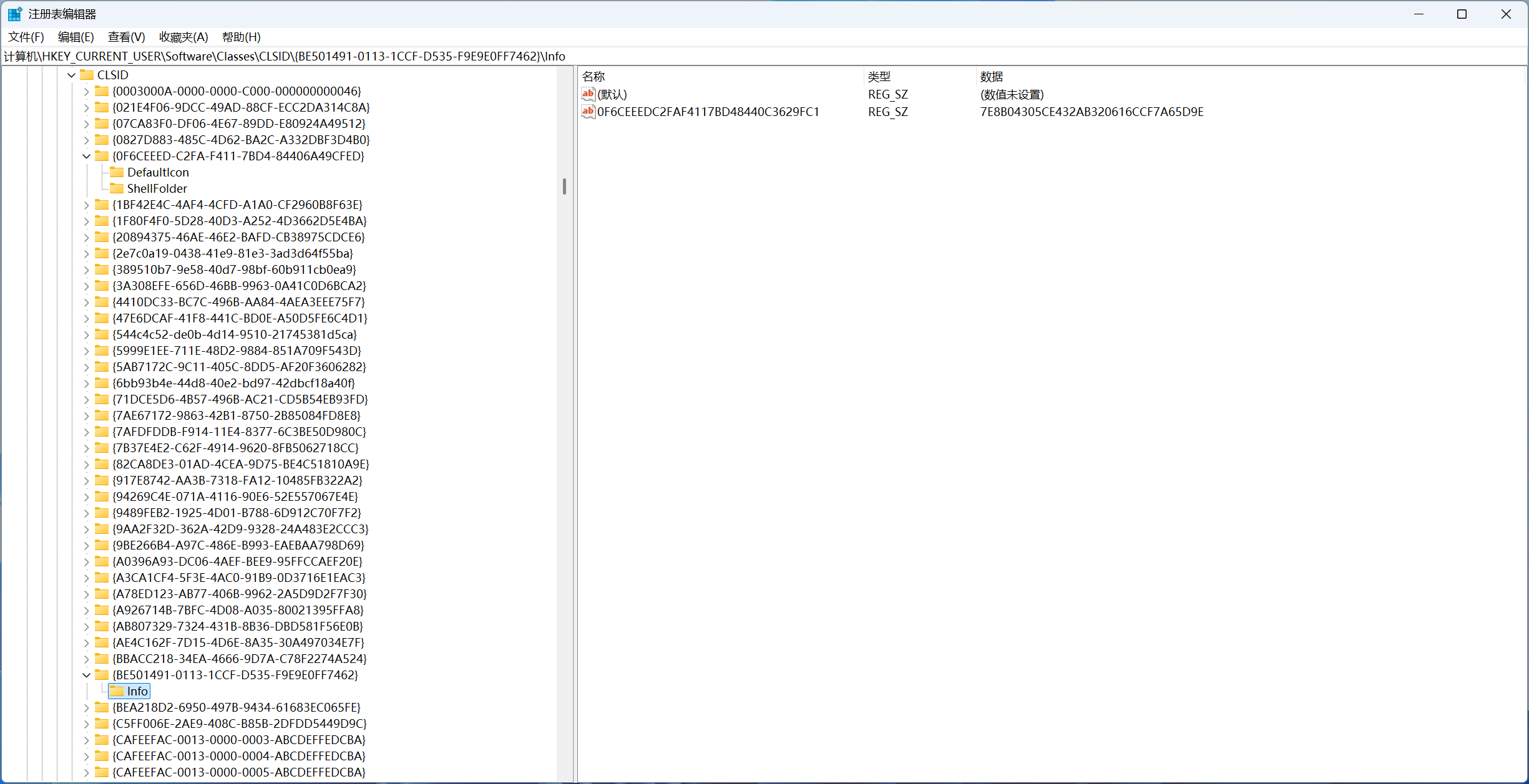
方法一:限制子健数量和名称 通过对比分析注册表在重置前后的差异发现 {XXXXXXXX-XXXX-XXXX-XXXX-XXXXXXXXXXXX} 只会有一个子健 Info,{YYYYYYYY-YYYY-YYYY-YYYY-YYYYYYYYYYYY} 只会有两个子健 ShellInfo 和 DefaultIcon 且同时出现,举个例子
因此增强重置脚本的方式是限制子健的数量和名称,下面是一个 Python 脚本
1
2
3
4
5
6
7
8
9
10
11
12
13
14
15
16
17
18
19
20
21
22
23
24
25
26
27
28
29
30
31
32
33
34
35
36
37
38
39
40
41
42
43
44
45
46
47
48
49
50
51
52
53
54
55
56
57
58
59
60
61
62
63
64
65
66
67
68
69
70
71
72
73
74
75
76
77
78
79
80
81
82
83
84
85
86
87
88
89
90
91
92
93
94
95
96
97
98
import winregdef get_sub_key_names (key: winreg.HKEYType ) -> list [str ]: sub_key_names: list [str ] = [] index = 0 while True : try : sub_key_name = winreg.EnumKey(key, index) sub_key_names.append(sub_key_name) index = index + 1 except OSError: break return sub_key_names def get_candidate_class_ids () -> tuple [list [str ], list [str ]]: root_key = winreg.OpenKey(winreg.HKEY_CURRENT_USER, r"Software\Classes\CLSID" ) class_ids = get_sub_key_names(root_key) winreg.CloseKey(root_key) infos = [] shell_folders = [] for class_id in class_ids: if class_id.startswith("{CAFEEFAC-" ): continue class_id_key = winreg.OpenKey(winreg.HKEY_CURRENT_USER, r"Software\Classes\CLSID" + "\\" + class_id) sub_key_names = get_sub_key_names(class_id_key) winreg.CloseKey(class_id_key) if len (sub_key_names) == 1 : if sub_key_names[0 ] == "Info" : infos.append(class_id) if len (sub_key_names) == 2 : has_default_icon = False has_shell_folder = False for sub_key_name in sub_key_names: if sub_key_name == "DefaultIcon" : has_default_icon = True if sub_key_name == "ShellFolder" : has_shell_folder = True if has_default_icon and has_shell_folder: shell_folders.append(class_id) return infos, shell_folders def show_candidate_class_ids (): infos, shell_folders = get_candidate_class_ids() print ("包含 Info 的键:" ) for class_id in infos: print (f" {class_id} " ) print ("包含 DefaultIcon 和 ShellFolder 的键:" ) for class_id in shell_folders: print (f" {class_id} " ) def remove_class_ids (): infos, shell_folders = get_candidate_class_ids() for class_id in infos: print (rf"删除包含 Info 的键:HKEY_CURRENT_USER\Software\Classes\CLSID\{class_id}" ) winreg.DeleteKey(winreg.HKEY_CURRENT_USER, r"Software\Classes\CLSID" + "\\" + class_id + "\\" + "Info" ) winreg.DeleteKey(winreg.HKEY_CURRENT_USER, r"Software\Classes\CLSID" + "\\" + class_id) for class_id in shell_folders: print (rf"删除包含 DefaultIcon 和 ShellFolder 的键:HKEY_CURRENT_USER\Software\Classes\CLSID\{class_id}" ) winreg.DeleteKey(winreg.HKEY_CURRENT_USER, r"Software\Classes\CLSID" + "\\" + class_id + "\\" + "DefaultIcon" ) winreg.DeleteKey(winreg.HKEY_CURRENT_USER, r"Software\Classes\CLSID" + "\\" + class_id + "\\" + "ShellFolder" ) winreg.DeleteKey(winreg.HKEY_CURRENT_USER, r"Software\Classes\CLSID" + "\\" + class_id) def remove_registration (): premium_key = winreg.OpenKey(winreg.HKEY_CURRENT_USER, r"Software\PremiumSoft\NavicatPremium" ) sub_key_names = get_sub_key_names(premium_key) winreg.CloseKey(premium_key) for sub_key_name in sub_key_names: if sub_key_name == "Registration" : continue if not sub_key_name.startswith("Registration" ): continue print (rf"删除 Registration 键:HKEY_CURRENT_USER\Software\PremiumSoft\NavicatPremium\{sub_key_name}" ) winreg.DeleteKey(winreg.HKEY_CURRENT_USER, r"Software\PremiumSoft\NavicatPremium" + "\\" + sub_key_name) print (rf"删除 Update 键:HKEY_CURRENT_USER\Software\PremiumSoft\NavicatPremium\Update" ) winreg.DeleteKey(winreg.HKEY_CURRENT_USER, r"Software\PremiumSoft\NavicatPremium\Update" ) if __name__ == "__main__" : remove_registration() remove_class_ids()
PowerShell 版 1 2 3 4 5 6 7 8 9 10 11 12 13 14 15 16 17 18 19 20 21 22 23 24 25 26 27 28 29 30 31 32 33 34 35 36 37 38 39 40 41 42 43 44 45 46 47 48 49 50 51 52 53 54 55 56 57 58 59 60 61 62 63 64 65 66 67 68 69 70 71 72 73 74 75 76 77 78 79 80 81 82 83 84 85 86 87 88 89 90 91 92 93 94 95 96 97 function Get-CandidateClassIds $clsidPath = "HKCU:\Software\Classes\CLSID" $infos = @ () $shellFolders = @ () $classIds = @ (Get-ChildItem -Path $clsidPath -ErrorAction SilentlyContinue | ForEach-Object { $_ .PSChildName }) foreach ($classId in $classIds ) { if ($classId .StartsWith("{CAFEEFAC-" )) { continue } $subKeyPath = "$clsidPath \$classId " $subKeyNames = @ (Get-ChildItem -Path $subKeyPath -ErrorAction SilentlyContinue | ForEach-Object { $_ .PSChildName }) if ($subKeyNames .Count -eq 1 ) { if ($subKeyNames [0 ] -eq "Info" ) { $infos += $classId } } if ($subKeyNames .Count -eq 2 ) { $hasDefaultIcon = $subKeyNames -contains "DefaultIcon" $hasShellFolder = $subKeyNames -contains "ShellFolder" if ($hasDefaultIcon -and $hasShellFolder ) { $shellFolders += $classId } } } return @ ($infos , $shellFolders ) } function Show-CandidateClassIds $result = Get-CandidateClassIds $infos = $result [0 ] $shellFolders = $result [1 ] Write-Host "Keys containing Info:" foreach ($classId in $infos ) { Write-Host " $classId " } Write-Host "Keys containing DefaultIcon and ShellFolder:" foreach ($classId in $shellFolders ) { Write-Host " $classId " } } function Remove-ClassIds $result = Get-CandidateClassIds $infos = $result [0 ] $shellFolders = $result [1 ] $clsidPath = "Software\Classes\CLSID" foreach ($classId in $infos ) { Write-Host "Deleting key containing Info: HKEY_CURRENT_USER\$clsidPath \$classId " Remove-Item -Path "HKCU:\$clsidPath \$classId \Info" -ErrorAction SilentlyContinue Remove-Item -Path "HKCU:\$clsidPath \$classId " -ErrorAction SilentlyContinue } foreach ($classId in $shellFolders ) { Write-Host "Deleting key containing DefaultIcon and ShellFolder: HKEY_CURRENT_USER\$clsidPath \$classId " Remove-Item -Path "HKCU:\$clsidPath \$classId \DefaultIcon" -ErrorAction SilentlyContinue Remove-Item -Path "HKCU:\$clsidPath \$classId \ShellFolder" -ErrorAction SilentlyContinue Remove-Item -Path "HKCU:\$clsidPath \$classId " -ErrorAction SilentlyContinue } } function Remove-Registration $navicatPath = "Software\PremiumSoft\NavicatPremium" $premiumKey = Get-Item -Path "HKCU:\$navicatPath " -ErrorAction SilentlyContinue if ($premiumKey ) { $subKeyNames = @ ($premiumKey .GetSubKeyNames()) $premiumKey .Close() foreach ($subKeyName in $subKeyNames ) { if ($subKeyName -eq "Registration" ) { continue } if (-not $subKeyName .StartsWith("Registration" )) { continue } Write-Host "Deleting Registration key: HKEY_CURRENT_USER\$navicatPath \$subKeyName " Remove-Item -Path "HKCU:\$navicatPath \$subKeyName " -ErrorAction SilentlyContinue } } Write-Host "Deleting Update key: HKEY_CURRENT_USER\$navicatPath \Update" Remove-Item -Path "HKCU:\$navicatPath \Update" -ErrorAction SilentlyContinue } Remove-Registration Remove-ClassIds
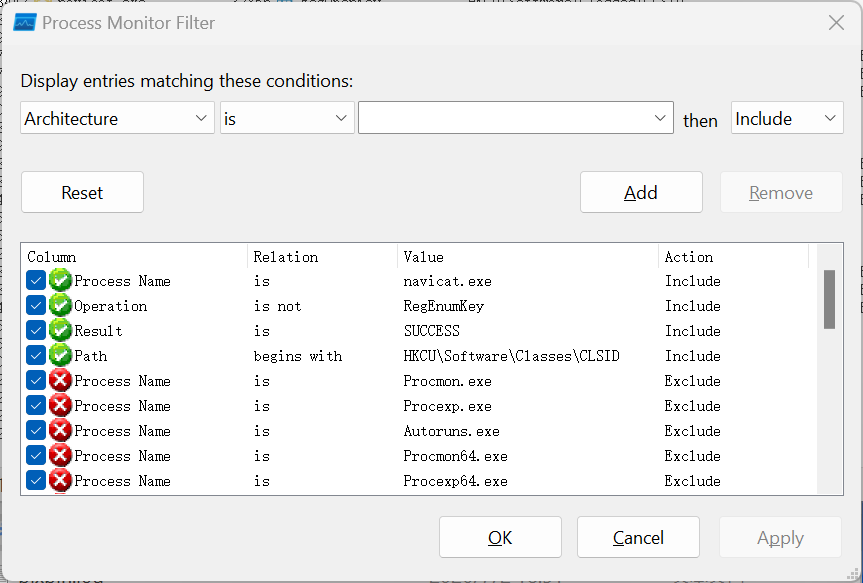
方法二:使用进程监视器精确定位 上面的增强方式还是有缺陷,因为其他软件可能也会有相同的键名称使用方式。一种改进的方法是通过 Sysinternals 提供的进程监视器 找到目标键,为了实现目标需要配置过滤器
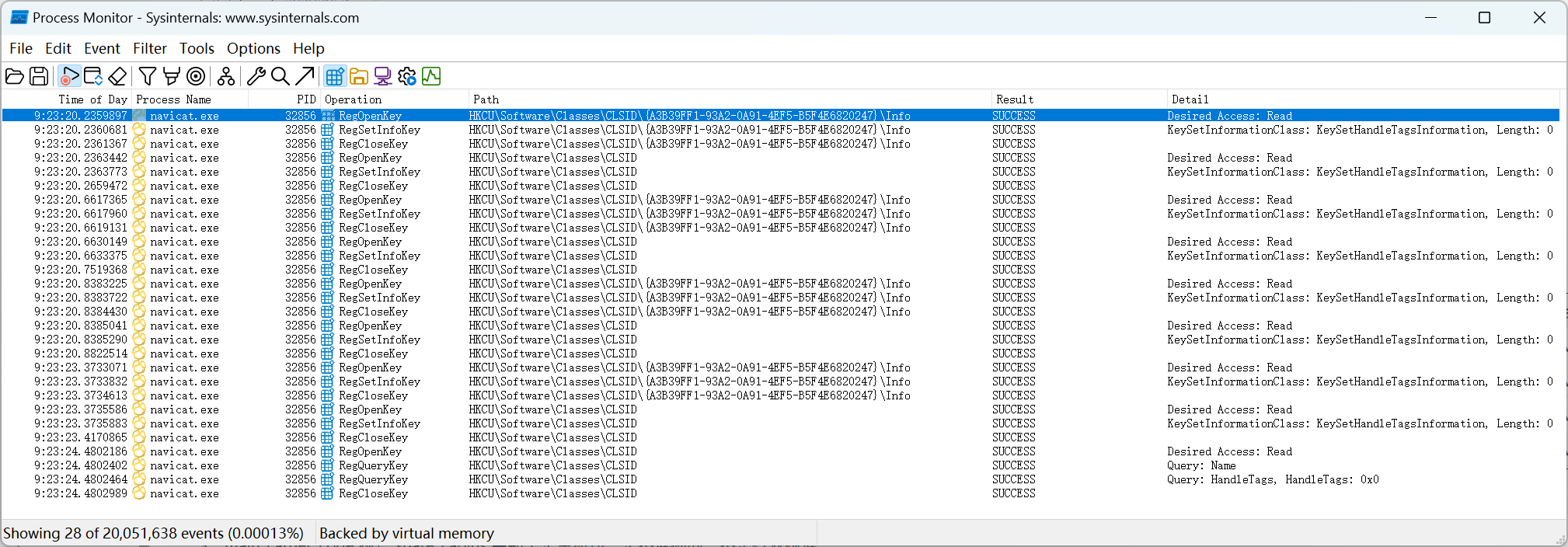
配置好过滤器后重启 Navicat,然后就可以看到类似下面的结果
从上图中就可以发现 Navicat 使用的包含 Info 的键为 {A3B39FF1-93A2-0A91-4EF5-B5F4E6820247},这个键对同一台电脑上的同一个版本的 Navicat 是不变的。
通过进程监视器 没能找到包含 ShellFolder 的键,但我们观察到 Info 键的值名称 0F6CEEEDC2FAF4117BD48440C3629FC1 的前 24 位,即 0F6CEEEDC2FAF4117BD48440,与包含 ShellFolder 键的 {0F6CEEED-C2FA-F411-7BD4-8440C3629FC1} 的前面部分,即 {0F6CEEED-C2FA-F411-7BD4-8440,一样。这个发现在另一台电脑上得到了验证
同时在同一台电脑上观察多次删除注册表并重启 Navicat 后注册表的结果发现 {YYYYYYYY-YYYY-YYYY-YYYY-YYYYYYYYYYYY} 的具体值每次都不一样,但是它前面部分与 Info 键的值名称的前面部分一样。
基于以上发现可以实现一个更精准的删除注册表键的 Python 脚本
1 2 3 4 5 6 7 8 9 10 11 12 13 14 15 16 17 18 19 20 21 22 23 24 25 26 27 28 29 30 31 32 33 34 35 36 37 38 39 40 41 42 43 44 45 46 47 48 49 50 51 52 53 54 55 56 57 58 59 60 61 62 63 64 65 66 67 68 69 70 71 72 73 74 75 76 77 78 79 80 81 82 83 84 85 86 87 88 89 90 91 92 93 94 95 96 97 98 99 100 101 102 103 104 105 106 107 import winregfrom typing import Any def get_sub_key_names (key: winreg.HKEYType ) -> list [str ]: sub_key_names: list [str ] = [] index = 0 while True : try : sub_key_name = winreg.EnumKey(key, index) sub_key_names.append(sub_key_name) index = index + 1 except OSError: break return sub_key_names def get_values (key: winreg.HKEYType ) -> list [tuple [str , Any , int ]]: values: list [tuple [str , Any , int ]] = [] index = 0 while True : try : value_name, value_data, data_type = winreg.EnumValue(key, index) values.append((value_name, value_data, data_type)) index = index + 1 except OSError: break return values def remove_registration (): premium_key = winreg.OpenKey(winreg.HKEY_CURRENT_USER, r"Software\PremiumSoft\NavicatPremium" ) sub_key_names = get_sub_key_names(premium_key) winreg.CloseKey(premium_key) for sub_key_name in sub_key_names: if sub_key_name == "Registration" : continue if not sub_key_name.startswith("Registration" ): continue print (rf"删除 Registration 键:HKEY_CURRENT_USER\Software\PremiumSoft\NavicatPremium\{sub_key_name}" ) winreg.DeleteKey(winreg.HKEY_CURRENT_USER, r"Software\PremiumSoft\NavicatPremium" + "\\" + sub_key_name) for sub_key_name in sub_key_names: if not sub_key_name == "Update" : continue print (rf"删除 Update 键:HKEY_CURRENT_USER\Software\PremiumSoft\NavicatPremium\Update" ) winreg.DeleteKey(winreg.HKEY_CURRENT_USER, r"Software\PremiumSoft\NavicatPremium\Update" ) def remove_class_ids (): info_class_id = "{BE501491-0113-1CCF-D535-F9E9E0FF7462}" info_key = winreg.OpenKey(winreg.HKEY_CURRENT_USER, r"Software\Classes\CLSID" + "\\" + info_class_id + "\\" + "Info" ) values = get_values(info_key) winreg.CloseKey(info_key) if len (values) == 0 or len (values) > 1 : print ("Info 键的值项数量不为 1,暂停删除 CLSID" ) return value_name, value_data, data_type = values[0 ] shell_folder_class_id_prefix = "{" + f"{value_name[:8 ]} -{value_name[8 :12 ]} -{value_name[12 :16 ]} -{value_name[16 :20 ]} -{value_name[20 :24 ]} " root_key = winreg.OpenKey(winreg.HKEY_CURRENT_USER, r"Software\Classes\CLSID" ) sub_key_names = get_sub_key_names(root_key) winreg.CloseKey(root_key) shell_folder_class_ids = [] for sub_key_name in sub_key_names: if sub_key_name.startswith(shell_folder_class_id_prefix): shell_folder_class_ids.append(sub_key_name) if len (shell_folder_class_ids) == 0 or len (shell_folder_class_ids) > 1 : print ("ShellFolder 键的数量不为 1,暂停删除 CLSID" ) return shell_folder_class_id = shell_folder_class_ids[0 ] root_key = winreg.OpenKey(winreg.HKEY_CURRENT_USER, r"Software\Classes\CLSID" + "\\" + info_class_id) sub_key_names = get_sub_key_names(root_key) winreg.CloseKey(root_key) for sub_key_name in sub_key_names: winreg.DeleteKey(winreg.HKEY_CURRENT_USER, r"Software\Classes\CLSID" + "\\" + info_class_id + "\\" + sub_key_name) print (rf"删除包含 Info 的键:HKEY_CURRENT_USER\Software\Classes\CLSID\{info_class_id}" ) winreg.DeleteKey(winreg.HKEY_CURRENT_USER, r"Software\Classes\CLSID" + "\\" + info_class_id) root_key = winreg.OpenKey(winreg.HKEY_CURRENT_USER, r"Software\Classes\CLSID" + "\\" + shell_folder_class_id) sub_key_names = get_sub_key_names(root_key) winreg.CloseKey(root_key) for sub_key_name in sub_key_names: winreg.DeleteKey(winreg.HKEY_CURRENT_USER, r"Software\Classes\CLSID" + "\\" + shell_folder_class_id + "\\" + sub_key_name) print (rf"删除包含 ShellFolder 的键:HKEY_CURRENT_USER\Software\Classes\CLSID\{shell_folder_class_id}" ) winreg.DeleteKey(winreg.HKEY_CURRENT_USER, r"Software\Classes\CLSID" + "\\" + shell_folder_class_id) if __name__ == "__main__" : remove_registration() remove_class_ids()
PowerShell 版 1 2 3 4 5 6 7 8 9 10 11 12 13 14 15 16 17 18 19 20 21 22 23 24 25 26 27 28 29 30 31 32 33 34 35 36 37 38 39 40 41 42 43 44 45 46 47 48 49 50 51 52 53 54 55 56 57 58 59 60 61 62 63 64 65 66 67 68 69 70 71 72 73 74 75 76 77 78 79 80 81 82 83 84 85 86 87 88 89 90 91 92 93 94 95 96 97 98 99 100 101 102 103 104 105 106 107 function Remove-Registration $key = Get-Item -Path "HKCU:\Software\PremiumSoft\NavicatPremium" -ErrorAction SilentlyContinue if (-not $key ) { Write-Host "NavicatPremium registry key not found, skipping" return } $subKeyNames = $key .GetSubKeyNames() $key .Close() foreach ($subKeyName in $subKeyNames ) { if ($subKeyName -eq "Registration" ) { continue } if (-not $subKeyName .StartsWith("Registration" )) { continue } Write-Host "Deleting Registration key: HKEY_CURRENT_USER\Software\PremiumSoft\NavicatPremium\$subKeyName " Remove-Item -Path "HKCU:\Software\PremiumSoft\NavicatPremium\$subKeyName " -Recurse -Force -ErrorAction SilentlyContinue } foreach ($subKeyName in $subKeyNames ) { if (-not ($subKeyName -eq "Update" )) { continue } Write-Host "Deleting Update key: HKEY_CURRENT_USER\Software\PremiumSoft\NavicatPremium\Update" Remove-Item -Path "HKCU:\Software\PremiumSoft\NavicatPremium\Update" -Recurse -Force -ErrorAction SilentlyContinue } } function Remove-ClassIds $infoClassId = "{BE501491-0113-1CCF-D535-F9E9E0FF7462}" $infoKey = Get-Item -Path "HKCU:\Software\Classes\CLSID\$infoClassId \Info" -ErrorAction SilentlyContinue if (-not $infoKey ) { Write-Host "Info key not found, skipping CLSID removal" return } $valueNames = $infoKey .GetValueNames() $infoKey .Close() if ($valueNames .Count -eq 0 -or $valueNames .Count -gt 1 ) { Write-Host "Info key value count is not 1, skipping CLSID removal" return } $valueName = $valueNames [0 ] $shellFolderClassIdPrefix = "{$ ($valueName .Substring(0,8))-$ ($valueName .Substring(8,4))-$ ($valueName .Substring(12,4))-$ ($valueName .Substring(16,4))-$ ($valueName .Substring(20,4))" $rootKey = Get-Item -Path "HKCU:\Software\Classes\CLSID" -ErrorAction SilentlyContinue if (-not $rootKey ) { Write-Host "CLSID registry key not found, skipping CLSID removal" return } $allClsidNames = $rootKey .GetSubKeyNames() $rootKey .Close() $shellFolderClassIds = @ () foreach ($clsidName in $allClsidNames ) { if ($clsidName .StartsWith($shellFolderClassIdPrefix )) { $shellFolderClassIds += $clsidName } } if ($shellFolderClassIds .Count -eq 0 -or $shellFolderClassIds .Count -gt 1 ) { Write-Host "ShellFolder key count is not 1, skipping CLSID removal" return } $shellFolderClassId = $shellFolderClassIds [0 ] $rootKey = Get-Item -Path "HKCU:\Software\Classes\CLSID\$infoClassId " -ErrorAction SilentlyContinue if ($rootKey ) { $subKeyNames = $rootKey .GetSubKeyNames() $rootKey .Close() foreach ($subKeyName in $subKeyNames ) { Remove-Item -Path "HKCU:\Software\Classes\CLSID\$infoClassId \$subKeyName " -Recurse -Force -ErrorAction SilentlyContinue } Write-Host "Deleting Info key: HKEY_CURRENT_USER\Software\Classes\CLSID\$infoClassId " Remove-Item -Path "HKCU:\Software\Classes\CLSID\$infoClassId " -Recurse -Force -ErrorAction SilentlyContinue } $rootKey = Get-Item -Path "HKCU:\Software\Classes\CLSID\$shellFolderClassId " -ErrorAction SilentlyContinue if ($rootKey ) { $subKeyNames = $rootKey .GetSubKeyNames() $rootKey .Close() foreach ($subKeyName in $subKeyNames ) { Remove-Item -Path "HKCU:\Software\Classes\CLSID\$shellFolderClassId \$subKeyName " -Recurse -Force -ErrorAction SilentlyContinue } Write-Host "Deleting ShellFolder key: HKEY_CURRENT_USER\Software\Classes\CLSID\$shellFolderClassId " Remove-Item -Path "HKCU:\Software\Classes\CLSID\$shellFolderClassId " -Recurse -Force -ErrorAction SilentlyContinue } } Write-Host "Starting Navicat eval reset..." Remove-Registration Remove-ClassIds Write-Host "Reset completed"